


Part 4: Editing in Lenya
There are several editors that you can use in Lenya, but because we only have used 2 of them, these are the ones we will briefly go over here.
Kupu
Kupu is a WYSIWYG editor that was developed through OSCOM and has been integrated into Lenya. The editor is quite simple to use, and has an aggressive timeline for future improvements. You can see a screenshot of Kupu in action below:
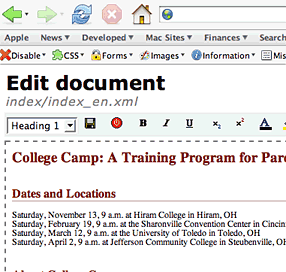
When you install Lenya, you'll notice that when you try to edit a page in your publication using it, you'll get a message stating to build it before you can use it. You'll need to go to Kupu's main directory and type make to build it properly:
            cd /usr/local/tomcat/webapps/lenya/lenya/resources/kupu
            make
You may get an error stating that the build could not be completed successfully because it could not find xsltproc. If this is the case, you'll need to download the xsltproc package and install it before continuing. Since we are using RedHat Linux, we'll give you the steps for installing the RPM. Adapt the instructions for your own OS.
First off, check to see if you have the proper RPMs:
rpm -qa | grep libxml2 rpm -qa | grep libxslt
If nothing is returned for either one of them (or both), then there's two ways to download the proper RPMs. One is by using RPMFind. Go to these URLs:
- http://rpmfind.net/linux/rpm2html/search.php?query=libxml2
- http://rpmfind.net/linux/rpm2html/search.php?query=libxslt
Look for your OS and download the appropriate RPM. Once downloaded to your server, install the packages:
            rpm -ivh libxml2-2.5.10-7.i386.rpm
            rpm -ivh libxslt-1.0.33-5.i386.rpm
The version numbers are probably different from the latest. Just be sure you get the latest versions of each.
The second way is if you use RedHat's up2date program (you must be registered with RedHat). To use this, just run the following command:
            up2date --showall | grep libxml2
            up2date --showall | grep libxslt
Once the package names are found, you can download them from the up2date server like so:
            up2date --get libxml2-2.5.10-7.i386
            up2date --get libxslt-1.0.33-5.i386
The RPMs will be stored in /var/spool/up2date/. Go there, then install them as mentioned above (recapped below as well):
            rpm -ivh libxml2-2.5.10-7.i386.rpm
            rpm -ivh libxslt-1.0.33-5.i386.rpm
Those that are savvy with up2date can find a more efficient way to install these RPMs, but this will do for now. Once the RPMs are installed, go back to Kupu's directory and run make as mentioned above. Now you're ready to edit using Kupu!
BXE
Bitflux Editor (BXE) is another WYSIWYG editor that was developed separately from Lenya and integrated into the project. BXE's approach is slightly different from Kupu's in that from the visual standpoint, it appears as if you are editing the content right on the layout of the page. Kupu, from the screenshot above, gives you a whole new page that focuses just on the content. We'll let you work with either one and decide which is your favorite. Hiram College chose to use Kupu, not because BXE was worse, but because Kupu was more flexible and easier to understand for the faculty and staff that were using it. Below is a screenshot of BXE at work:
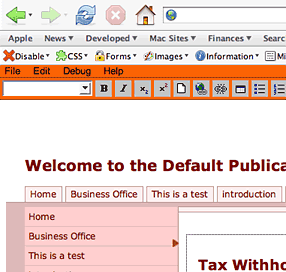
In version 1.2.4, BXE is already installed and ready to go, so there's no need for any added configuration.
Next articles
Well, we wanted to keep this one short, as we are working on cooking up some more heftier articles, including customizing your navigation and an intro to doctypes and usecases.