


Search:

Apache » Lenya
project logo
  • Project
  • Developer
  • Community
  • Version 2.0
  • Version 1.2
  • Version 1.2
    • Installation
      • Download
      • Subversion Access
      • Install Instructions
    • Tutorial
      • Introduction
      • 1. Understanding Lenya
      • 2. Installing Lenya
      • 3. Anatomy of the Pipeline
      • 4. Editing in Lenya
      • 5. Custom Navigation in Lenya
      • 6a. Mod Proxy and Lenya
      • 6b. Mod Proxy and Lenya
    • How-To
      • FAQ
      • New Publication
      • Deploy Publication
      • Look and Feel
      • Custom Resource Type
      • Adding Mime Types
      • Site Navigation
      • LDAP Authentication
      • CMS Menus
      • CMS Screens
      • Search Publications
      • External Data
      • Unit Tests
    • Components
      • Access Control
        • Basic Terms
        • Access Controllers
        • Access Controller Resolvers
        • Authenticators
        • Authorizers
        • Policies and Policy Managers
        • Accreditable Managers
        • SSL Encryption
      • Authoring
        • Adding a new document creator
        • Image Upload
        • OpenOffice
      • Deployment
        • Proxying
      • Editors
        • HTML Form Editor
        • HTML One Form Editor
        • Bitflux Editor
        • Kupu
        • Xopus
      • Layout
        • Navigation
        • XHTML templating
        • Serving static resources
        • Lenya Menubar
      • Publication
        • PageEnvelopeModule
        • Site tree
      • Resource Types
        • Resource Types
      • Revision Control
        • Revision Controller
        • RCML
        • Check In
        • Check Out
        • Revisions
        • Rollback
      • Repository
        • WebDAV Servers
      • Search
        • Searching with Lucene
      • URI Handling
        • URI Parametrizer
        • URI Scheme
        • Usecases
      • Asset Management
        • Asset Management
      • Link Management
        • Link Management
      • Meta Data
        • Meta Data Handling
      • Multilingual Documents
        • Multilingual Document Handling
      • Tasks
        • The Task Concept
        • Defining Tasks
        • The TaskAction
        • Scheduling a Task
        • Included tasks
          • AntTask
          • DefaultFilePublisher
          • StaticHTMLExporter
          • MailTask
        • Developing Tasks
      • Workflow
        • Terms
        • The State Machine
        • Configuration
        • Implementation
      • Site Management
        • Archive
        • Copy
        • Deactivate
        • Delete
        • Delete the trash
        • Move
        • Move Up/Down
        • Rename
        • Restore
    • Miscellaneous
      • Namespaces
      • Reserved Names
      • XInclude Processor
    • 1.2 API (Javadoc)

Current Event

Built with Apache Lenya

The Navigation Framework

Table of Contents
  • Introduction
  • Architecture
  • Using the Navigation Framework
    • Loading a Navigation Component
    • Aggregating the Navigation Components
  • Developing Navigation Components

Introduction

To goal of the navigation framework is to

  • simplify and standardize the generation of navigation widgets like menubars, tabs, breadcrumb paths.

With the approach that is presented here it shall be possible to

  • use pre-defined XHTML navigation components and present them with a custom CSS,
  • override these components in a publication whereby the logic can be reused, and
  • create and integrate new publication-specific navigation components using the same scheme.

Architecture

The navigation framework consists of the following components:

/lenya/navigation.xmap
The sitemap where the navigation components are loaded.

/lenya/xslt/navigation/*.xsl
The default navigation components that are shipped with Lenya.

/lenya/pubs/lenya/xslt/navigation/*.xsl
Custom navigation components of the publication.

Using the Navigation Framework

Loading a Navigation Component

You can load a navigation component from the following URI:

cocoon://navigation/<pub-id>/<component>/<path>.xml

The URI steps are:

<pub-id>
The publicaton ID.
<component>
The navigation component to load (tabs, menu, etc.).
<path>
The navigation path. It is a concatenation of the href attributes of the sitetree nodes that lead to the current node, e.g. demo/oscom.html for the sitetree fragment
<site xmlns="http://apache.org/cocoon/lenya/sitetree/1.0">
  <node href="demo/" label="Demo">
    <node href="oscom.html" label="OSCOM"/>
    ...
  </node>
  ...
</site>

Aggregating the Navigation Components

The basic principle is shown in the following figure:
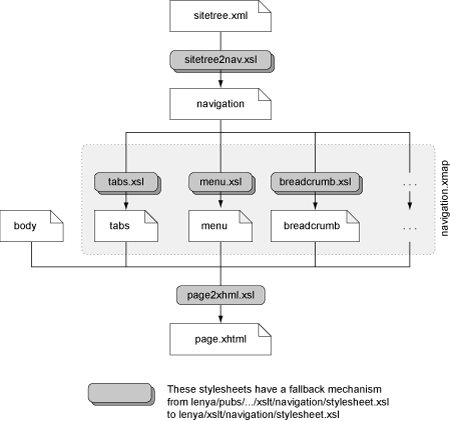
In the publication sitemap (lenya/pubs/<pub-id>/sitemap.xmap) the navigation components are aggregated. Here you decide which components you want to use:

    <map:pipeline>
      <map:match pattern="navigation/**.html">
(1)       <map:aggregate element="page" prefix="page"
              ns="http://apache.org/cocoon/lenya/cms-page/1.0">
              
(2)         <map:part src="cocoon://navigation/
                {publication-id}/breadcrumb/{../1}.html.xml"/>
                
(3)         <map:part src="cocoon://navigation/
                {publication-id}/tabs/{../1}.html.xml"/>
                
(4)         <map:part src="cocoon://navigation/
               {publication-id}/menu/{../1}.html.xml"/>
               
          </map:aggregate>
          
(5)       <map:transform src="xslt/page2xhtml.xsl">
(6)          <map:parameter name="root"
                 value="{context}/{publication-id}/"/>
          </map:transform>
        
(7)     <map:serialize type="xhtml"/>

      </map:match>
    </map:pipeline>
  1. The navigation elements are aggregated together with other document parts.
  2. Load the breadcrumb XHTML fragment.
  3. Load the tabs XHTML fragment.
  4. Load the menu XHTML fragment.
  5. Create the XHTML page.
  6. The stylesheet can use this parameter to generate absolute URLs.
  7. Finally, serialize the page as XHTML.

Developing Navigation Components

The following contracts define the development of navigation components:

  • A navigation component is an XSLT stylesheet that is located at

    lenya/xslt/navigation/<component>.xsl
    for default components and

    lenya/pubs/<publication-id>/lenya/xslt/<component>.xsl
    for default components.

  • The default components produce an XHTML fragment with the top level element <div class="<component>"/>.

Copyright © 1999-2011 The Apache Software Foundation. All rights reserved.

Apache Lenya, Apache, and the Apache feather logo are trademarks of The Apache Software Foundation.